Built for mobile groomers

Run your mobile grooming business without it running your life.

The customers and pets, the appointments, the day on the road and the payments. Keep the work of grooming and the work of running your business together.

No credit card required. Set up your business at your own pace.

GroomCaptain is scheduling and business-management software for pet groomers, especially mobile grooming businesses. Manage appointments, customer records and business settings in a computer or phone browser. The GroomCaptain app adds device features such as phone calendar access, call/text/directions actions and Tap to Pay on supported phones.

My Day Your next stop, in view.
My Day shows Daisy's 9 AM appointment, address, pet care notes, an unconfirmed warning and appointment actions.
Real My Day screens with sample appointments. Call, text and directions depend on your device.

One dog. A whole day around her.

From the first note about a dog
to the last dollar collected.

Follow Bella through a typical groom, then see how the rest of the business comes together.

An example story, illustrated with real product screens from sample accounts.

A familiar face

Meet Bella.

Her owner wants a full groom next Thursday. A teddy-bear face, please. And a little care with that long, curly coat.

Keep the customer, pet details, handling notes and grooming history together, so the next visit starts with what you already know.

Bella's pet record: Mini Goldendoodle, medium, curly, long/thick coat, with a previous groom and temperament notes.
Bella’s real sample pet record. Her coat and previous groom stay with her profile.

A little more coat. A little more care.

This groom may need more time.

A photo can help suggest pet characteristics. The customer can confirm or edit them. Your configured services and Estimate Rules help estimate the time and price.

AI-assisted estimates.
Your pricing. Your rules.

AI suggests Your rules
Photo analysis says Suggested from photo — please confirm or edit, above an editable Goldendoodle breed field.
A separate photo example: suggestions stay editable.

Here’s a real example with Bruno

A long, thick coat has a rule of its own.

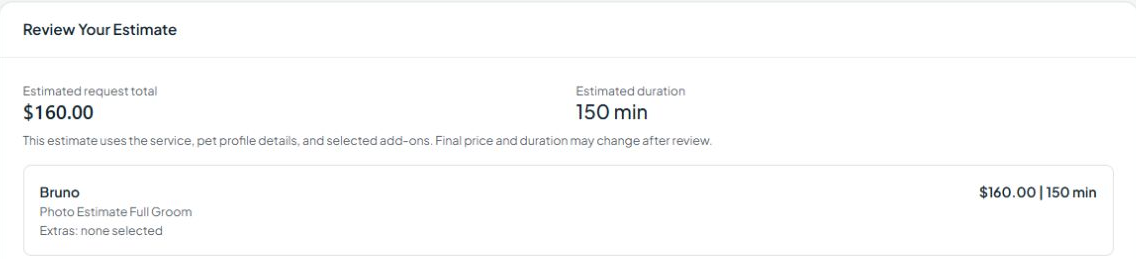
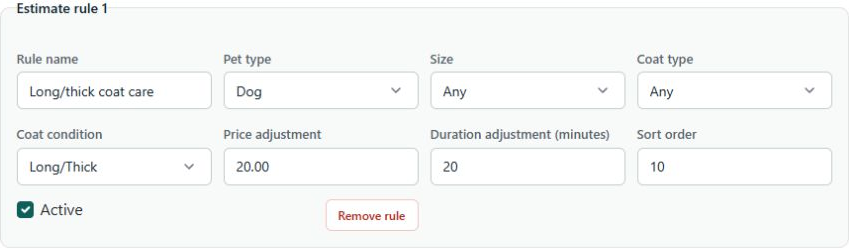
This business adds $20 and 20 minutes for long/thick coat care. Bruno’s estimate is $160 / 150 minutes. Final price and duration may change after review.

Bruno is a separate sample pet, with his own service and pricing rules.

Bruno's Review Your Estimate card shows estimated total $160 and 150 minutes, with final price and duration subject to review.
Bruno’s estimate. Final price and duration may change after review. View full size ↗
See the business’s Estimate Rule The active Long/thick coat care rule adds 20 to the price and 20 minutes to the duration. View full size ↗

Now, find a place in the day

Bella needs a time you can actually get to.

An empty calendar slot doesn’t tell you whether you can drive there. Customer booking can check service areas, availability and configured travel limits before offering a time.

Scheduling uses its own rules. A grooming estimate does not automatically reserve that many minutes on the calendar.

Let customers handle routine booking.

Customers can request offered times after giving their pet, service and address details. Choose whether bookings need your approval. When enabled, secure reschedule links let customers choose another available time within your rules.

Customer booking offers appointment times, with 10 AM selected for a request.
A sample customer’s time selection, before submitting a request. View dates and times ↗

Make room for life, too

Your calendar, connected.

Connect Google Calendar from the GroomCaptain app or website, or connect your device calendar from the mobile app.

Personal time, kept private.

With sync configured, approved busy times appear as blocked time in the GroomCaptain app and website. Personal event titles and notes aren’t shown.

Your work in your phone calendar.

Turn on export to your connected Google Calendar, then add that calendar to your phone to see your GroomCaptain appointments and finalized shifts there.

Before Thursday arrives

A reminder. One less thing to remember.

With reminders set up and the customer’s consent in place, send a prompt before the appointment. Use a standard confirmation reply, or choose a deposit request instead.

Routine confirmations take care of themselves. Changes get your attention.

Standard confirmation

“YES”

A supported YES reply records a standard confirmation. If a deposit is required to confirm, YES does not replace payment.

Needs you

Plans change.

NO doesn’t simply cancel the appointment. A reschedule request can receive a link to choose another time; other replies may need review.

Example reply behavior. Bella’s sample account has no text consent; these screens don’t show a sent reminder.

Thursday morning

Bella is already in My Day.

The next stop, the address, the drive and the appointment are right in front of you. Open the pet record or appointment when you need the details.

Keep notes and useful actions close to the work, with anything that needs attention called out.

Bella Reynolds in My Day with Doodle Groom, address, a 12-minute drive and 20-minute gap, and an unconfirmed appointment warning.
Bella’s next stop. The sample appointment is still unconfirmed, and My Day makes that visible.

Groom finished

Finish the groom.
Take the payment.
On to the next stop.

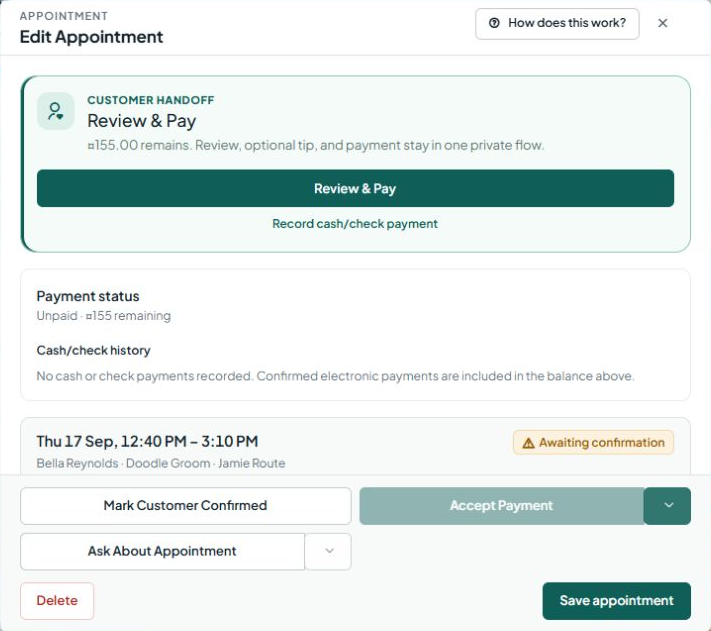
Open Review & Pay from the appointment, with the balance and optional tip in one flow. Record cash or check payments, or use card payments after payment setup.

Take payment on your phone. No separate card reader.

Collect the remaining balance with Tap to Pay on a supported iPhone or Android phone, using the GroomCaptain app with completed Stripe setup.

Bella's appointment has Review & Pay, an unpaid balance, cash/check recording and an unavailable Accept Payment button.
Payment entry on Bella’s sample appointment, before payment. Card acceptance needs setup; this is not a completed charge. View full size ↗

Keep a good thing going

Bella’s next visit doesn’t have to start another text conversation.

Keep regular customers on a standing schedule. Set a grooming cadence, preferred day and number of repeats, with controls to pause or cancel the series.

Bruno's standing appointment repeats every six weeks on Saturday, with a next due date and three repetitions.
Bruno’s separate sample series shows the setup. A standing appointment does not mean future visits are customer-confirmed. View series settings ↗

And when the plan changes

A slot opens up. Find who fits.

Fill This Slot finds candidates from customers who have booked that service before. Review reasons such as past time-window fit, location match and when a customer is due back.

You choose whom to contact or book. Use Fill opening or prepare a Draft SMS to review before sending.

Fill This Slot explains a candidate's prior service visits, lack of appointment conflicts, time-window fit and location match.
Four suggestions, with reasons to review. No opening has been filled or message sent in this example. View candidates and actions ↗

Pull back from one appointment

That was one dog.
Here’s the business.

One screen for grooming.
Another for running the place.

Today brings appointments, booking requests, unconfirmed visits and customer handoffs into view. See what needs you, then go straight to the work.

Today dashboard with four appointments, $400 projected revenue estimated from service prices, customer handoffs and Smart Scheduling.
Today, from a sample business. Projected revenue is estimated from service prices, not collected payments. View full dashboard ↗

Know what needs attention.

Requests, availability issues, unconfirmed appointments and handoffs ready for customers. A customer handoff is the private end-of-visit flow for feedback, an optional tip and any remaining payment.

See where the day goes.

Grooming, estimated driving, buffers and remaining capacity, with Route Protection status. Route Protection applies your configured travel and coverage limits when checking customer booking options.

Find the next useful action.

Open Schedule or Smart Scheduling to work on bookings, openings and follow-ups.

Room for the whole business

One groomer or a team. Keep the day organized.

See appointments assigned across your groomers and incoming booking requests in one Schedule. Keep customer and pet context close to each appointment.

Owners can oversee the business in Today; groomers have their work in My Day. Shifts, time off and other team tools depend on your role and the features enabled for your business.

Sample Schedule assignments include Taylor North Van, Casey South Van and Morgan Central Van.
Appointments across three groomers in a sample team agenda. View team agenda ↗
Digital waivers Get required acknowledgements and signatures without paper.

When a form is required, customers can review it, enter their name and agree before signing during booking.

Agree and Sign action on a required digital acknowledgement that has not yet been signed.
The sample form is unsigned. View complete form ↗

Pricing

Pick the plan that fits the way you groom.

Start with the tools that fit your business. Monthly prices are shown below.

One groomer

Solo

$39/month

One groomer who wants customers to book, reschedule and pay without calling.

  • 1 groomer / 1 active mobile grooming unit
  • 500 SMS segments/month (about 500 short texts)
  • Online booking, self-reschedule and travel-aware scheduling
  • Two-way texting, reminders, customer and pet records
  • Deposits, card on file and standard payments
  • Digital agreements and a shareable booking page
Start free trial

Teams and multiple vans

Team Route

$125/month

More than one groomer or van, with work to assign and approvals to route.

  • Everything in Smart Route
  • Up to 5 active mobile grooming units included
  • Additional active mobile grooming units: $50/month each
  • 2,000 SMS segments/month (about 2,000 short texts)
  • Team scheduling, staff permissions and reporting
Start free trial

30 days free. No credit card required. If you choose a paid plan during the trial, billing starts when the trial ends. Without a paid plan, trial access ends.

One SMS segment usually means one short text of up to 160 basic characters. Longer texts and characters such as emoji can use several segments. After the included monthly allowance, conversation texts, AI replies and marketing texts are blocked. Appointment and reminder texts can continue up to the monthly safety cap of 150% of the allowance; daily safety limits also apply. Overage billing is not currently enabled.

Start with your next appointment

Bring your business.
We’ll help you get it set up.

Guided tutorials help you get going. Turn on customer self-booking when you’re ready.

  1. Set your base.

    Add your business and location or service area.

  2. Add your services.

    Set prices and durations for the work you offer.

  3. Bring your regulars.

    Use the customer and pet spreadsheet templates. Import customers first, then match pets by their owner’s email or phone. Preview before importing.

  4. Book the first groom.

    Create an appointment and get familiar with your day.

  5. Share booking, when ready.

    Enable customer self-booking if it suits your business.

Before you start

A few practical questions.

Running solo or working with a team, you stay in control.

Do customers need an app?

No. Customers can open your booking and appointment links in a browser.

Do I have to let customers book themselves?

No. You can create appointments yourself and turn on customer self-booking when you are ready.

Can I bring my existing customer and pet list?

Yes. Use the customer and pet spreadsheet templates, preview the records, and import customers before their pets. Pet rows match an existing owner by email or phone. Review the results before booking.

What happens after the 30-day trial?

Registration does not require a card. Without a paid plan, trial access ends. If you choose a paid plan during the trial, billing starts when the trial ends.

How do payments work?

Payments stay with the appointment. You can record cash or check payments with no setup, but card payments require Stripe setup, and processing fees apply- only from Stripe; we add no fees. Tap to Pay on iPhone or Android requires a supported phone, the GroomCaptain app and completed payment setup.

Does this work for a solo groomer?

Yes. Solo covers customer and pet records, online booking, reminders and appointment payments. Smart Route adds advanced service areas and travel rules for mobile work.

What changes when I have employees?

Team Route adds team availability and assignments. Access to shifts, time off and other team tools depends on your role and the features enabled for your business.

What happens without a signal?

Some previously loaded information can be available from saved data on supported app screens. This is not full offline operation: do not rely on booking, edits, messaging, payments or synchronization without a connection.

Want the details?

Explore all features.

A closer look at the work GroomCaptain brings together.

Customers & the next booking

Customer and pet records, grooming history, spreadsheet imports, customer online booking, secure self-reschedule links, digital waivers, appointment reminders and confirmation replies.

The mobile day & your team

My Day, the unified Schedule, booking requests, service areas, travel limits, employee assignments, shifts and time off where enabled.

Estimates, payments & the business

Services and pricing, editable photo suggestions, Estimate Rules, optional deposit confirmation at booking, appointment creation or reminder time, appointment balances, Tap to Pay on supported phones, Today, reports and business settings.

Keeping the next groom in sight

Recurring standing appointments, Smart Scheduling, customers due to rebook, Fill This Slot candidates and follow-up drafts you review before sending.

Rather see it first?

Get a walkthrough.

Useful if you run a team, drive several vans, or have a list of customers you need to bring across. Tell us roughly how the business works and we will show you the parts that apply — not a generic tour.

A little more room in your day

More time for the dogs. More room for your life.

Start with your business, your customers and your next appointment. Guided tutorials help you find your way.

Rejoining the server...

Rejoin failed... trying again in seconds.

Failed to rejoin.
Please retry or reload the page.

The session has been paused by the server.

Failed to resume the session.
Please reload the page.